How Phishing Attacks Work and How to Prevent Them
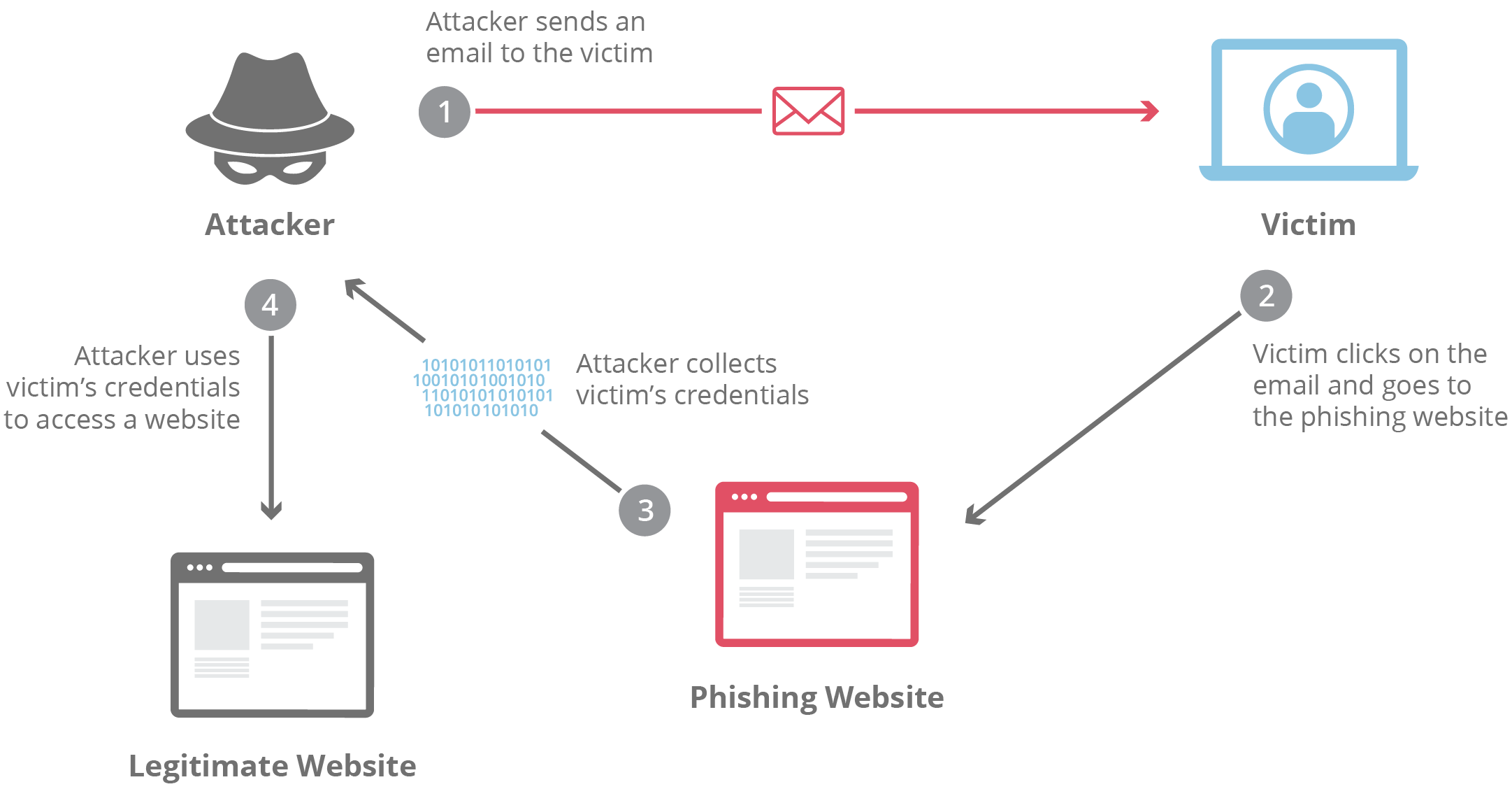
In our increasingly digital world, the threat of Phishing Attacks looms larger than ever, as cybercriminals employ cunning strategies to deceive unsuspecting individuals and organizations. With sophisticated tactics evolving constantly, recognizing the signs of these malicious attempts can be a challenge. In this blog post, we will delve into the nature of phishing, explore common techniques used by attackers, and arm you with best practices to safeguard your personal and sensitive information. Additionally, we’ll cover essential steps to take if you find yourself falling victim to these scams, ensuring you stay one step ahead in protecting your digital life.
Understanding Phishing Attacks
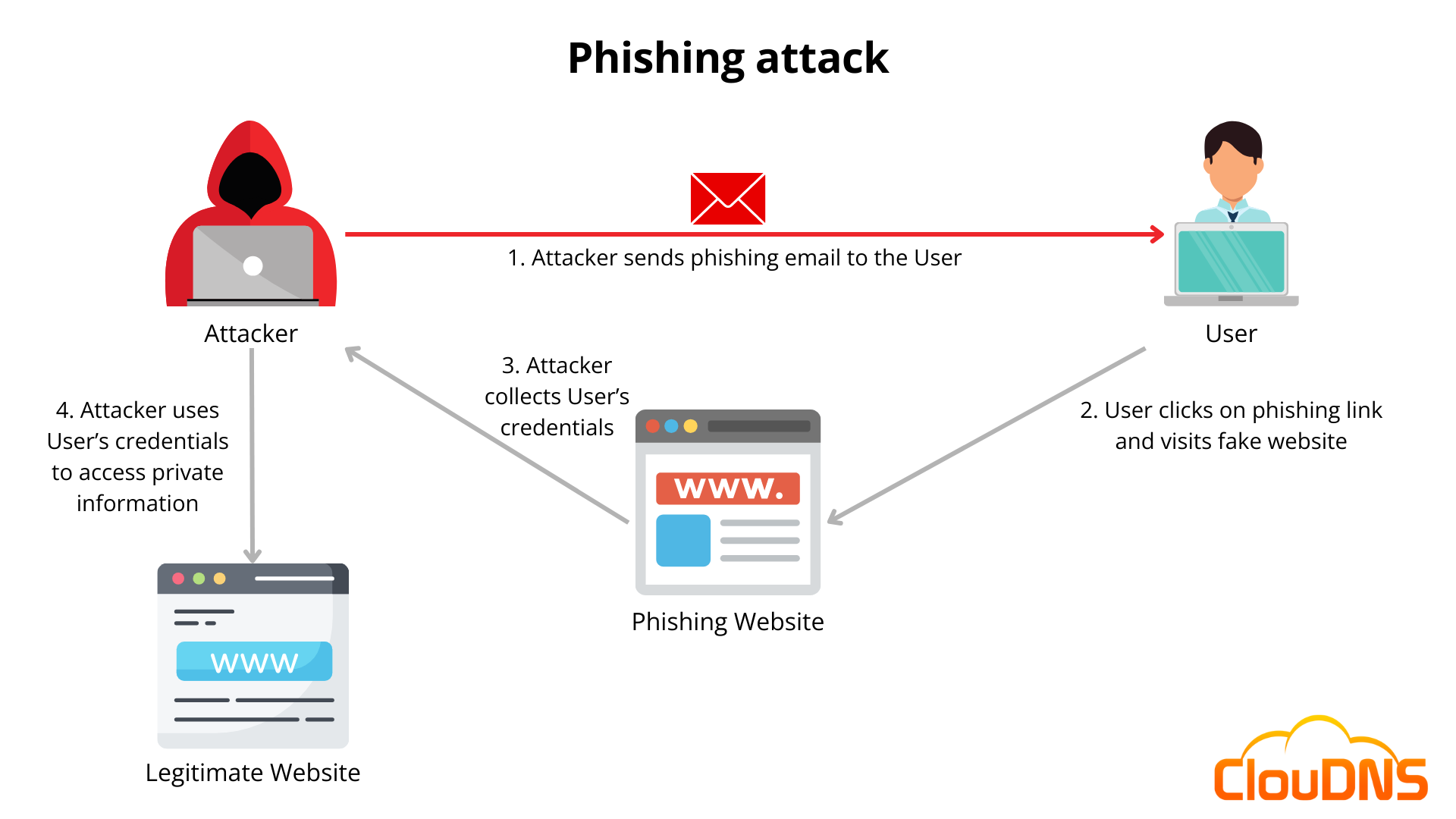
Phishing attacks are a deceptive means of acquiring sensitive information, primarily through fraudulent communications. Understanding the mechanics behind Phishing Attacks can help you stay one step ahead. Here are some essential elements:
- Definition: A phishing attack typically involves tricking the recipient into revealing personal information, such as usernames, passwords, or credit card details.
- Methods: Cybercriminals often use emails, social media, or even text messages to initiate their deceptive tactics.
| Key Element | Description |
|---|---|
| Sender Identity | Often appears to be a trusted source (bank, company) |
| Urgency | Creates a sense of urgency to provoke hasty responses |
| Fake Links | Directs users to counterfeit websites |
| Malware Attachments | May include malicious files intended to compromise systems |
Awareness of these tactics can significantly enhance your ability to identify and avoid becoming a victim.
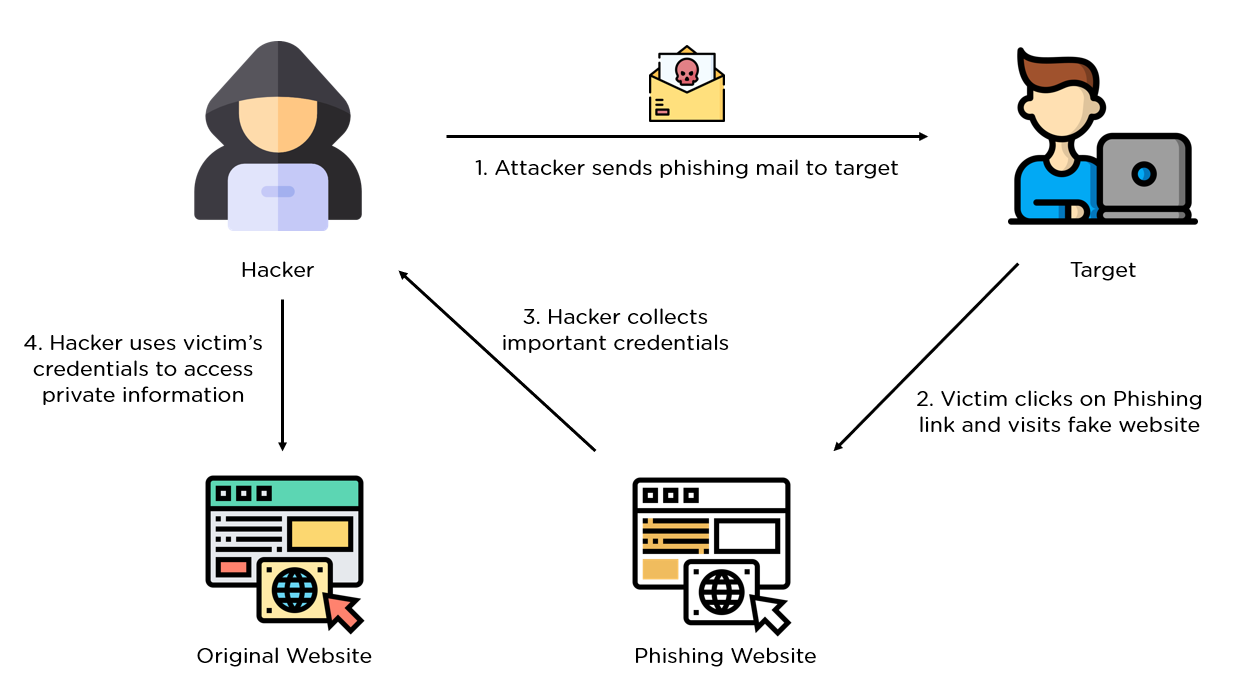
Common Types of Phishing Techniques
Phishing attacks are ever-evolving, with cybercriminals employing various techniques to deceive individuals. Understanding these methods is crucial for enhancing your defenses. Here are some common types of phishing techniques:
| Technique | Description |
|---|---|
| Email Phishing | Deceptive emails posing as trustworthy sources to steal personal data. |
| Spear Phishing | Targeted phishing aimed at specific individuals or organizations. |
| Whaling | A sophisticated form of spear phishing targeting high-profile figures. |
| Smishing | Phishing attempts conducted via SMS messages. |
| Vishing | Voice phishing, often using phone calls to fraudulently obtain information. |
“By recognizing these tactics, users can better safeguard their information.” Staying informed and vigilant serves as the first line of defense against Phishing Attacks. Always verify the source before clicking on links or providing sensitive data.
Signs of Phishing Attempts
Identifying Phishing Attacks is crucial for protecting your sensitive information. Here are some common signs to look out for:
- Suspicious Emails: Be wary of messages from unknown senders or those that have spelling errors and poor formatting. Legitimate organizations maintain high standards in their communications.
- Urgency or Threats: Many phishing messages create a false sense of urgency, claiming immediate action is essential to prevent negative consequences, like account suspension.
- Unexpected Attachments or Links: Avoid clicking on links or downloading attachments from unexpected emails, as they may lead to malware or malicious websites.
| Signs | Description |
|---|---|
| Suspicious sender | Unknown email addresses or unusual domains |
| Urgent calls to action | Requests for immediate response or threats involved |
| Uncharacteristic requests | Asking for personal information, passwords, or financial details |
| Poor language quality | Misspellings, incorrect grammar, and formatting errors |
By staying vigilant and recognizing these signs, you can significantly reduce your risk of falling victim to Phishing Attacks. Always verify the source before responding or taking action.
Best Practices for Preventing Phishing
“Preventing Phishing Attacks requires vigilance and a proactive approach.”
To safeguard your sensitive information, incorporate these best practices into your daily routine:
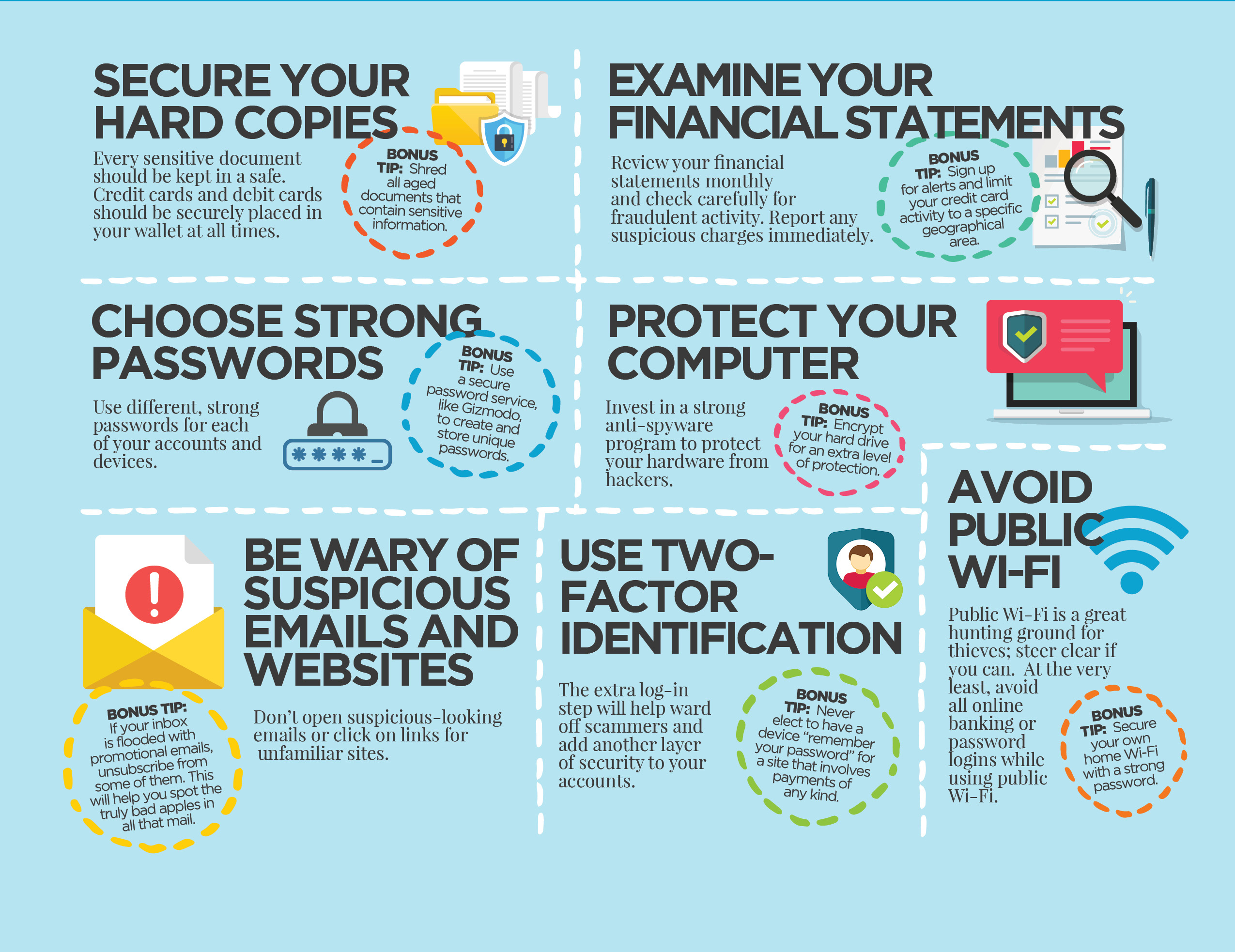
- Use Strong Passwords: Create complex passwords and change them regularly.
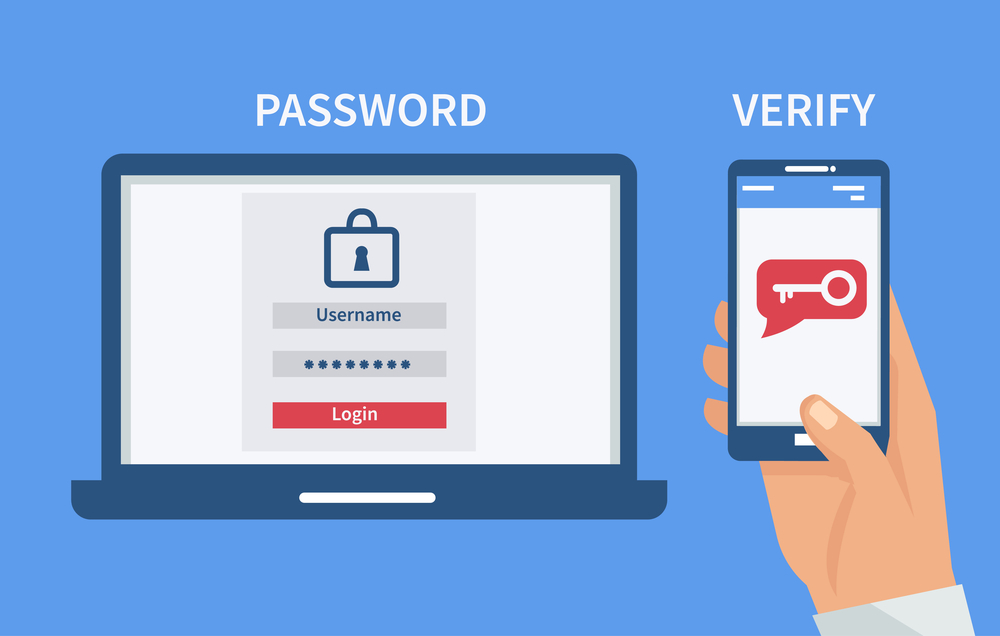
- Enable Two-Factor Authentication (2FA): This adds an extra layer of security.
- Be Cautious of Links: Hover over links to check their authenticity before clicking.
- Verify Requests: Always confirm any requests for sensitive information through official channels.
- Stay Informed: Keep yourself updated on the latest phishing scams and techniques.
| Practice | Description |
|---|---|
| Use Strong Passwords | Complex passwords prevent easy access to your accounts. |
| Enable Two-Factor Authentication | Adds a second layer of security, making unauthorized access harder. |
| Be Cautious of Links | Helps avoid clicking on malicious sites disguised as legitimate. |
| Verify Requests | Ensures you aren’t providing information to impostors. |
| Stay Informed | Knowledge of current scams enables better protection. |
By following these strategies, you can significantly reduce the chances of falling victim to Phishing Attacks and protect your digital identity.
What to Do If You Fall Victim to Phishing
If you suspect you’ve fallen victim to Phishing Attacks, immediate action is crucial. Follow these key steps to minimize potential damage:
| Step | Action |
|---|---|
| Change Passwords | Update passwords for affected accounts immediately. |
| Enable Two-Factor Authentication | Ensure this feature is activated to add an extra layer of security. |
| Contact Financial Institutions | Inform your bank or credit card company to monitor any suspicious activity. |
| Monitor Accounts | Regularly check your online accounts for unusual transactions. |
| Report the Incident | Notify your workplace IT department and local authorities to document the attack. |
| Educate Yourself | Learn more about Phishing Attacks to recognize future threats. |
By taking swift action and remaining vigilant, you can significantly reduce the risks associated with being a victim of Phishing Attacks.
Frequently Asked Questions
What is a phishing attack and how does it work?
A phishing attack is a type of cybercrime where attackers impersonate trustworthy entities to deceive individuals into providing personal information, such as passwords, credit card numbers, or social security numbers. These attacks typically occur through emails, text messages, or malicious websites that appear legitimate. When a victim unwittingly interacts with these fraudulent communications, they may be tricked into revealing sensitive information, allowing attackers to steal identities or access financial accounts.
What are the common signs of a phishing email?
Common signs of a phishing email include poor grammar and spelling, generic greetings (like ‘Dear Customer’), and an urgent call to action, often suggesting that immediate attention is required. Additionally, these emails may contain suspicious links or attachments that can lead to malware installation or phishing sites. Be cautious of any email that requests sensitive information or instructs you to click on hyperlinks without verifying the sender’s authenticity.
What steps can I take to prevent falling victim to phishing attacks?
To prevent falling victim to phishing attacks, always scrutinize emails and messages before responding or clicking on links. Utilize multi-factor authentication on your accounts for an added layer of security. Keeping your software, including antivirus programs, up to date is crucial, as is regularly educating yourself about the latest phishing tactics. Finally, always verify the sender’s email address, and if you’re uncertain about a message’s legitimacy, contact the entity directly before taking any action.
What should I do if I think I’ve been targeted by a phishing attack?
If you suspect that you’ve been targeted by a phishing attack, the first step is to cease any engagement with the fraudulent message. Change your passwords immediately, especially for accounts that could have been compromised. Monitor your financial statements and online accounts for unusual activity. Additionally, report the phishing attempt to your email provider and, if necessary, to local authorities or consumer protection agencies. This helps in tracking cybercriminal activities and can prevent others from falling victim.