How to Recognize Suspicious Financial Emails and Messages
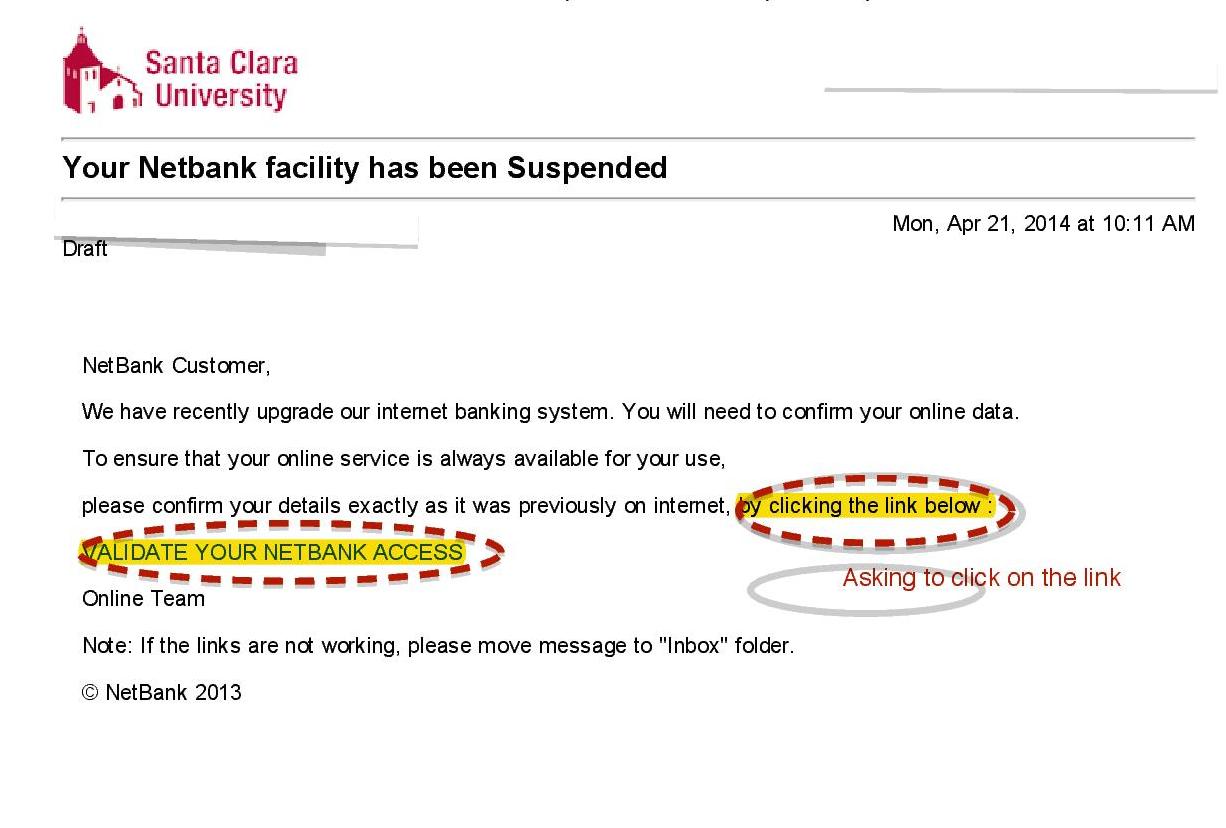
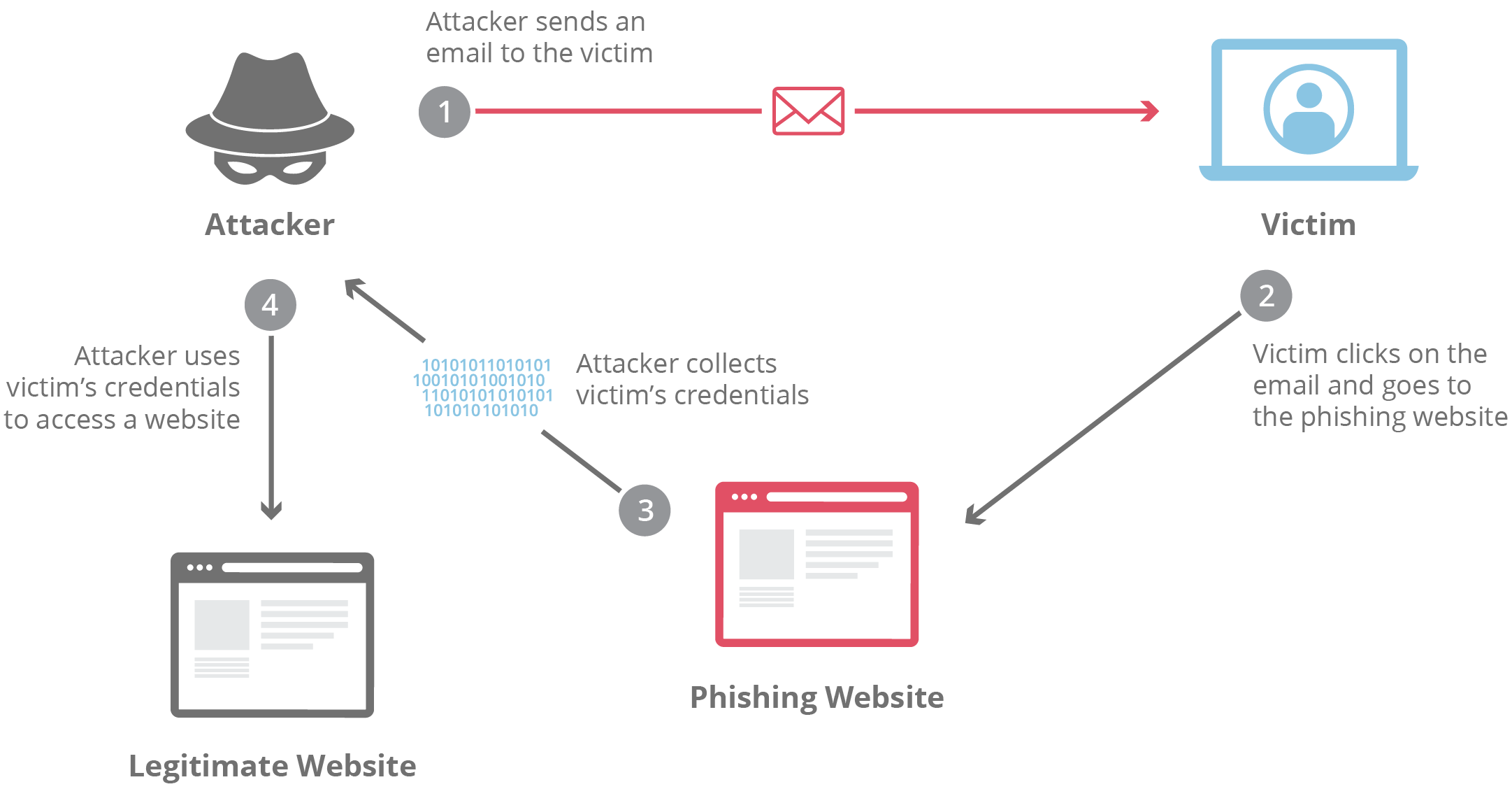
In today’s digital age, financial transactions increasingly take place over email and messaging platforms, making it essential to protect yourself from potential threats. Suspicious Financial Emails can often disguise themselves as legitimate requests, leaving many individuals vulnerable to phishing scams and fraud. Understanding the common traits of these communications is crucial for safeguarding your personal and financial information. In this post, we will explore key strategies for spotting phishing attempts, analyzing sender information, recognizing red flags in financial requests, and sharing best practices for responding to any suspicious messages you may encounter. Stay vigilant and informed to ensure your financial security in an ever-evolving digital landscape.
Understanding the Common Traits of Suspicious Financial Emails
Identifying suspicious financial emails is crucial for protecting your sensitive information. Here are the common traits to watch for:
- Generic Greetings: Phishing emails often use vague salutations like “Dear Customer” instead of your name.
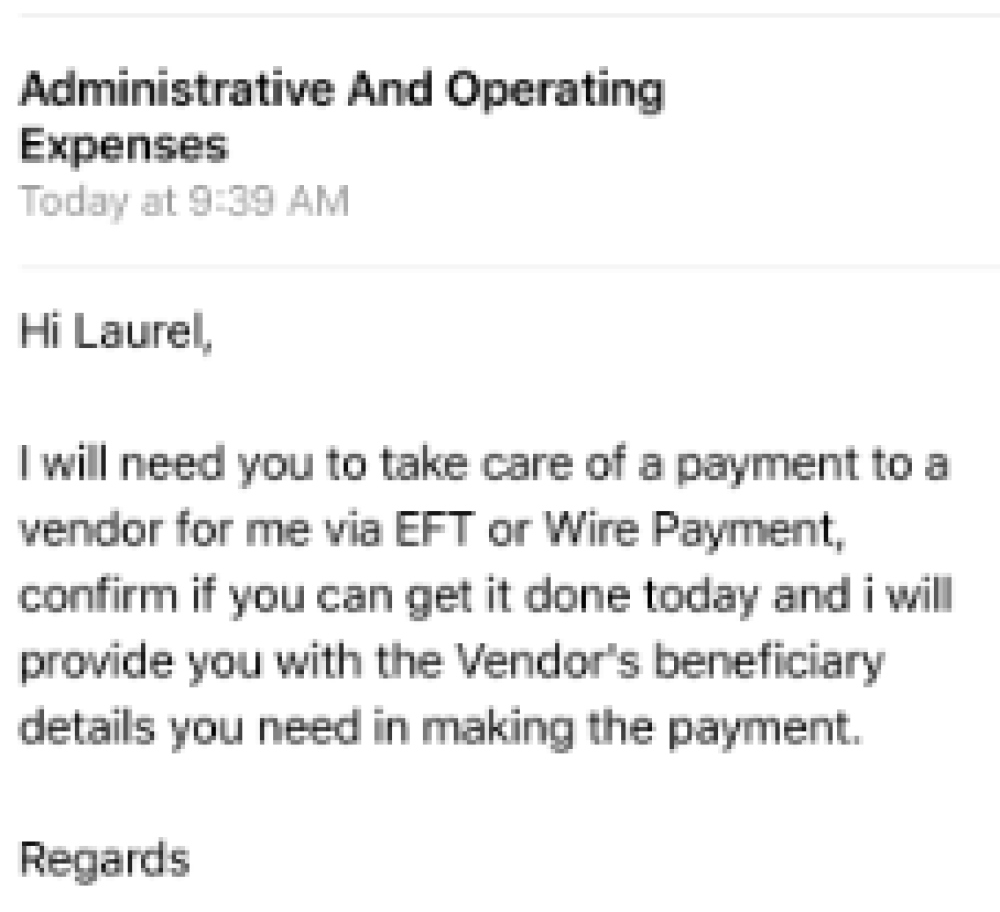
- Urgency and Pressure: Messages that create a false sense of urgency may pressure you into acting quickly without thorough consideration.
- Unusual Requests: Legitimate organizations rarely ask for sensitive personal information via email. Be skeptical of any requests for your passwords or financial details.
| Trait | Description |
|---|---|
| Spelling Mistakes | Pay attention to grammatical errors, as they can indicate a lack of professionalism. |
| Unfamiliar Senders | Emails from unknown or unverifiable addresses should be treated with caution. |
| Links to Unknown Sites | Links that lead to dubious websites should raise red flags; hover over them to inspect the URL. |
By recognizing these common traits, you can significantly reduce your risk of falling victim to cyber threats. Stay vigilant and prioritize your online safety!

How to Spot Phishing Attempts in Communications
Phishing attempts are increasingly sophisticated, making it essential to remain vigilant. “You must learn to question each unsolicited communication to safeguard your financial health.” Here are some key indicators to help you highlight potential threats in your inbox:
| Feature | Red Flag |
|---|---|
| Unknown Sender | Emails from unfamiliar sources should raise suspicion. |
| Generic Greetings | Be wary of messages that use vague salutations like “Dear Customer.” |
| Urgency or Threats | Phishing attempts often create a false sense of urgency or fear to elicit quick responses. |
| Unusual Links | Hover over links to verify their destination before clicking. |
| Poor Grammar | Frequent spelling or grammatical errors can indicate a scam. |
Staying informed about these Suspicious Financial Emails traits will empower you to approach communications with caution and discernment. Remember, a little skepticism can go a long way in protecting your sensitive information.
Analyzing Sender Information and Email Addresses
When it comes to identifying suspicious financial emails, scrutinizing the sender information is crucial. Start by checking the email address. Often, fraudsters use addresses that mimic legitimate ones but can contain subtle variations. For example, instead of “info@bank.com,” it might appear as “info@b4nk.com” or “info.bank@gmail.com“.
Key Factors to Analyze:
| Aspect | Red Flags | Legitimate Signs |
|---|---|---|
| Domain Name | Misspelled or unofficial domains | Well-known and correct domain names |
| Display Name | Generic names, incomplete names | Full names of companies or individuals |
| Reply-To Address | Mismatched or altered reply-to information | Matches the sender’s email address |
Additionally, examining the email headers can reveal vital information about the origin of the message. Look for inconsistencies in routing details that might indicate manipulation. Always trust your instincts—if the sender looks suspicious, exercise caution.
Recognizing Red Flags in Financial Requests
When evaluating financial requests, it’s crucial to identify Suspicious Financial Emails that may be trying to deceive you. Be on the lookout for specific warning signs that indicate potential fraud. Here are key red flags to consider:
- Unusual Urgency:
- Requests that press for immediate action often raise alarms.
- Poor Grammar or Spelling Mistakes:
- Legitimate organizations maintain professionalism in their communications.
- Unverified Links or Attachments:
- Hover over links before clicking to see the actual URL.
Common Red Flags Table
| Red Flag | Description |
|---|---|
| Generic Greetings | “Dear Customer” instead of your name indicates a mass email. |
| Immediate Action Required | Pressure to act quickly can mean a scam. |
| Unfamiliar Payment Methods | Requests for unconventional transfers or gift cards are suspect. |
As the saying goes, “If it sounds too good to be true, it probably is.” Always approach financial requests with caution and verify information through trusted channels. Awareness is your strongest defense against Suspicious Financial Emails.
Best Practices for Responding to Suspicious Messages
When dealing with Suspicious Financial Emails, maintaining a cautious approach is crucial. Here are some best practices to follow:
| Action | Description |
|---|---|
| Do Not Respond | Avoid replying to potentially harmful messages to prevent phishing. |
| Verify the Sender | Check email addresses and company names against official sources. |
| Report the Email | Notify your email provider and the organization being impersonated. |
| Use Official Channels | If the message claims urgency, contact the company directly using verified contact information. |
| Delete Immediately | If you determine the email is fraudulent, delete it to avoid accidental engagement. |
By adhering to these practices, you can protect yourself from scams associated with Suspicious Financial Emails while ensuring that your personal information remains secure.
Frequently Asked Questions
What are some common signs of a suspicious financial email?
Common signs of a suspicious financial email include unsolicited requests for personal information, poor grammar or spelling mistakes, generic greetings such as ‘Dear Customer’ rather than using your name, and a sense of urgency that pushes you to act quickly. Additionally, be wary of emails that contain links or attachments that you did not expect, or that do not come from verified email addresses of known organizations.
How can I verify the authenticity of a financial message?
To verify the authenticity of a financial message, first check the sender’s email address to ensure it matches the official domain of the organization. Look for signs of phishing, such as links that lead to unofficial websites. If the message requests sensitive information, contact the organization directly using a known contact method rather than responding through the email. Additionally, you can search online for reported scams related to that organization or message to see if others have encountered similar issues.
What steps should I take if I receive a suspicious financial email?
If you receive a suspicious financial email, do not click on any links or open any attachments. Mark the email as spam or junk in your email client and report it to your email provider. If you believe the email originates from a legitimate organization, contact them directly using verified contact methods to inquire about the authenticity of the email. Always be cautious and err on the side of skepticism when handling unexpected financial communications.
Are there specific tools to help identify phishing attempts in emails?
Yes, there are several tools designed to help identify phishing attempts in emails. Spam filters provided by many email services often automatically detect and quarantine suspicious messages. Additionally, browser extensions and software like antivirus programs have features that can warn users about known phishing sites and emails. Some organizations also offer free online services where you can check the legitimacy of links or send suspicious emails to be analyzed for potential phishing characteristics.